
Cue-Lang介绍
Cue,是一种开源语言,用于定义,生成和验证各种数据:配置,API,数据库模式,代码……。它能够将数据的结构、约束、数值作为同一层级成员,从而简化配置文件的生成。
Cue教程
Cue格式说明
- 使用
//进行单行注释 - 对象被称为结构体
- 对象成员称为结构字段
- 对于没有特殊字符的字段名,可以省略引号
- 结构字段后面无需
, - 在列表中的最后一个元素后放置
, - 最外层的
{}可省略
例子:
1 | str: "hello world" |
Cue 结构、约束、数据
1 | // 结构 |
1 | // 约束 |
1 | // 数据 |
Cue的最佳实践:从开放的结构模式开始,限制上下文可能性,最终具体到数据实例。
Cue哲学:为了保证唯一性,Cue的数据不会被覆盖。
Cue核心规则
- 数据可被重复定义,但必须值保持一致
- 结构字段可以被更强限制覆盖
- 结构的字段会被合并,如果是列表,必须严格匹配
- 规则可被递规应用
1 | hello: "world" |
结构
- 结构并不会输出
- 它的值可能是不确认、不完整的
- 字段必须完全
使用#mydef来定义结构,使用...来定义一个开放的结构体
1 | #Album: { |
1 | #Person: { |
约束
约束与数值使用&字符进行连接时,会将值进行校验
1 | // conjunctions on a field |
替换
使用|可以实现支持多种结构。同时它也可以为出错值设置替换值
1 | // disjunction of values (like an enum) |
默认值与可选
使用*来设置默认值, ?设置可选字段
1 | s: { |
开放模式与封闭模式
开放模式意味着结构可以扩展,关闭模式意味着不能扩展。 默认情况下,结构是开放模式,定义是封闭模式。 可以通过定义的最后添加...来申明开放模式定义;另外通过过close强制为结构体设置为关闭模式
1 | // Open definition |
推荐从基础定义开始,复用定义
在编写Cue时,推荐从基础定义开始,这样能够有更好的复用能力。
1 | #Base: { |
定义多行字符串
- 使用
"""来定义多行字符串
1 | str1: #"avoid using \ to "escape""# |
- 使用反引号(`)定义原始字符串
1 | multiline: ` |
- 使用#”…”# 定义原始字符串,可以避免转义
1 | multiline: #" |
- 使用 + 连接多个字符串
1 | multiline: "第一行\n" + |
List
List 可被定义为开放模式,这样便可与其它数据进行合并,
1 | empty: [] |
Struct
结构体是Cue的主要内容,也是最终数据的输出。如上介绍,默认情况下它是开放模式。除了使用Json类型形式进行设置值,还可通过级联:来设置,如a: hello: "world"
1 | // an open struct |
模式匹配约束
模式匹配允许您为与模式匹配的标签指定约束。可以将约束应用于字符串标签,并使用标识符来设置字段。
1 | #schema: { |
表达式
- 引用字段,使用
\(**)显用其它字段
1 | container: { |
- Cue也能够为通过
\(**)来设置key
1 | apps: ["nginx", "express", "postgres"] |
- List遍历
遍历List数据格式如下:[ for key, val in <iterable> [condition] { production } ]
1 | nums: [1,2,3,4,5,6] |
- 条件控制语句
没有else,所有判断都会被执行
1 | app: { |
标准库
Cue的标准库中包含了很多的帮助包(helper packages)。
- Encoding
1 | package stdlib |
- Strings
1 | package stdlib |
- List
1 | package stdlib |
- Constrain
1 | package stdlib |
模块和包
cuelang有module和package系统,可以import依赖
- 模块定义
- 通过在项目根目录创建cue.mod/module.cue文件来定义模块。通过
cue mod init <模块名>来初始化。 - 模块名格式通常为
domain.com/name或github.com/owner/repo
- package组织
- 一个模块可以包含多个package
- 允许在一个目录中包含多个package
- 导入package
- 使用绝对路径导入,不允许相对路径导入
- 导入时可以省略domain,表示导入内置标准包
- 可以在导入时重命名包
- 同一个包内的定义和值可以直接访问,无需导入
例子
1 | package deploy |
使用Cue制作脚本命令工具
Cue 拥有制作脚本命令工具的功能,它有一个工具层,可用来执行脚本、读写文件以及网络访问等。
规范:
- 脚本文件以
_tool.cue结尾 - 执行命令为
cue cmd <name>orcue <name>
例子:
- 脚本文件名为
ex_tool.cue
1 | package foo |
- prompter为命令名
- ask/echo/append/print为唯一标识
- cli.Ask/exec.Run/file.Append为函数,
- &{…}为函数参数
- 创建data.cue
1 | package foo |
- 运行:
cue cmd prompter
1 | $ cue cmd prompter |
- 使用cuelang exec.Run 执行多行代码
1 | package foo |
Tips
- A & B === B & A
- A === A
- 路径短写:{a : {b: {c: 5}}} == a: b: c: 5
- 多种类型:a | b | c
- 默认值:number | *1
- 算术: 4 + 5
- 变量引用:”Hello (person)”
- 列表遍历:[ x for x in y ]
- cue 执行 当前目录下的cue文件及父目录下同一个package的cue文件
- cue ./… 以上目录 + 遍历当前目录的子目录下的cue文件
- _开头的变量不会在输出结果中显示,作为局部变量
- [Name=_] 可用来定义一个模板,其中Name匹配任意字段。例如:
1
2
3application: [Name=_]: {
name: string | *Name
} - _|_ 可判断是否存在。例如:if _variable != _|_ { // … }
1
2
3
4
5
6
7a ?: string
if a == _|_ {
b: "a"
}
// 结果为
// cue export a.cue
// b: "a"1
2
3
4
5
6
7
8a: string
if a == _|_ {
b: "a"
}
// 结果为
// cue eval a.cue
// a: string
// b: "a" - 定义映射:map: [string]: string
- 定义切片:slice: […{name:string,value:string}]
实践
- 使用
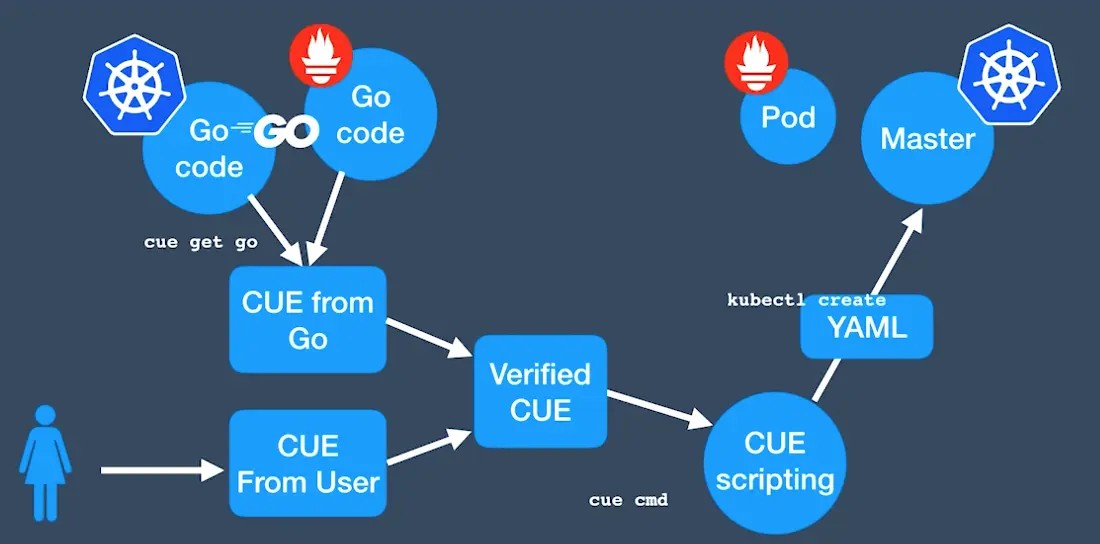
cue import将已有的yaml转成Cue语言
1 | $ cue import ./... -p kube -l '"\(strings.ToCamel(kind))" "\(metadata.name)"' -fR |
- 引入k8s资源的模块
1 | $ go mod init main |
- 导入k8s资源模块,并创建资源
1 | package kube |
- cue trim 可用来自动删除冗余字段,以简化配置文件
参考文档
本博客所有文章除特别声明外,均采用 CC BY-NC-SA 4.0 许可协议。转载请注明来源 Michael Blog!
相关推荐
2020-05-20
持续交付发布可靠软件的系统方法(部署流水线)第八章:自动化验收测试
《持续交付发布可靠软件的系统方法》读书笔记 验收测试通常是在每一个通过提交测试的软件版本上执行的。 验收测试的目的:对于一个单独的验收测试,它的目的是验证一个用户故事或需求的验收条件是否被满足。如功能验收条件和非功能验收条件。 如果每次提交测试后都在该版本上运行自动化验收测试,会有如下效果: 反馈环大大缩短,能够更快地定位问题 测试、开发人员和客户需要紧密合作才能创建一个良好的自动化测试套件,这会促进他们之间的良好合作 有助于让每个人更关注业务的价值 验收测试与单元测试的区别:验收测试是针对业务的,单元测试是面向开发的。 创建验收测试 分析人员与测试人员和客户紧密合作,定义验收条件 分析人员向开发人员讲解需求,以及它的业务上下文,并检查一遍验收条件 测试人员与开发人员讨论,并就“哪些自动化验收测试来证明验收条件被满足”达成一致 开发人员认为工作完成是指所有单元测试和组件测试通过,验收测试全部实现,并证明系统满足需求。此时可以向分析人员、测试人员和客户进行演示 应用程序驱动层应用程序驱动层是一个知道如何与应用程序打交道的层次。它所用的API是以某种...
2020-05-20
持续交付发布可靠软件的系统方法(基础篇)第三章:持续集成
《持续交付发布可靠软件的系统方法》读书笔记 持续集成要求每当有人提交代码时,就对整个应用进行构建,并对其执行全面的自动化测试集合,一旦出现问题,开发团队应停下手中的工作,修复问题。持续集成的目标是:让正在研发的软件一直处于可工作的状态。 实施持续集成的先决条件 版本控制,与项目相关的所有内容都必须提交到一个版本控制库中(产品代码、测试代码、数据库脚本、构建与部署脚本、以及所有用于创建安装运行和测试该应用的程序的东西) 自动化构建:必须满足人和计算机都能通过命令行自动执行应用的构建、测试以及部署过程 团队共识:持续集成是一种实践,需要团队所有成员都遵循规则 一个基本持续集成系统 第一次在持续集成工具上执行构建时,可能会缺少一些必须的软件及配置,请将所操作的工作记录下来,并放在自己项目的知识共享库中,应花一些时间将应用程序所依赖的所有软件和配置项提交到版本控制系统中,并将重建全新环境的整个活动变成一个自动化的过程 查看一下是否有构建正在运行,如果有,等它运行完。如果它失败了,则与团队其他人一起将它修复,后再提交自己的代码 一量构建完成且测试全部通过,就从版本控制库中将该版本的代码更...
2020-05-21
使用Ansible-Tower与Jenkins集成实现CI-CD
Ansible Tower是什么?Ansible Tower是一个基于Web的用户界面,提供了IT自动化的企业解决方案。它有一个友好用户的仪表板来管理部署和监控资源。Ansible Tower为Ansible增加自动化,可视化管理和监控能力。 为什么要使用Ansible Tower替换Ansible与Jenkins集成?使用Ansible Tower与Jenkins集成,打开了一个充满可能性的世界。与一篇中介绍的《Ansible与Jenkins集成实现CI/CD》进行比较,它可以从Jenkins中删除很多配置,比如部署应用的服务器的访问配置,管理playbook执行,最重要的是,避免在Jenkins端配置SSH密钥,同时Jenkins不需要知道应用程序的部署服务器地址:它可能位于公有云中,物理机中,甚至是笔记本电脑上的虚拟客户端。 把这些配置与过程都放到Ansible Tower中进行集中管理。 Ansible Tower的组件 Credentials: Ansible Tower在运行作业时,访问Tower外部服务或者连接主机时需要进行身份验证。Credenti...
2020-05-20
Gitea访问使用KeyCloak作为用户管理
一、安装keyCloak 二、配置KeyCloak,添加ClientsClients -> createClient ID: devops-oidcEnabled: trueClient Protocol: openid-connectAccess Type: confidentialValid Redirect URIs: /* 三、配置Gitea,添加Authentication SourcesSite Administration -> Authentication Sources -> Add Authentication SourceOAuth2 Provider: OpenID ConnectClient ID(key): devops-oidcClient Secret: <keycload 中 devops-oidc Credentials中查询>OpenID Connect Auto Discovery URL: http:///auth/realms/master...
2023-06-07
Bash中的换行
换行在平常的shell编程中是经常遇到的,但是有时也会忽略掉一些问题。本篇中将会介绍多种方式实现输出换行的方法。 使用 echoecho 自带换行echo 命令输出字符串,在最后后会添加一个换行 123root@Michael:~# echo hello worldhello worldroot@Michael:~# 添加 -n 可以禁用echo最后的换行 12root@Michael:~# echo -n hello worldhello worldroot@Michael:~# 换行符”\n”但是当我们使用bash执行以下命令时,发现它并没有换行 123root@Michael:~# bash -c "echo \"\n\""\nroot@Michael:~# 而是需要加一个 -e 1234root@Michael:~# bash -c "echo -e \"\n\""root@Michael:~# 从echo的说明中可以看到 -e 指的是让转义符生效,其中有: 1234567891011121...
2020-05-20
Jenkins-Pipeline触发机制
设置好了功能强大的流水线后,接下来我们要做的就是去执行流水线,如果都靠手动去触发流水线,显然不符合带着自动化基因新一代工程师的风格,必须自动触发。那么Jenkins的Pipeline支持哪些触发机制呢。一起来看一下。 定时触发:croncron规则与crontab的规则是一样的 12345678910111213pipeline{ agent any triggers{ cron('0 0 * * *') } stages{ stage('半夜触发'){ steps{ echo "凌晨执行" } } }} 轮询代码仓库周期性检查代码,看代码是否有更新。这种方式需要使用 12345678910111213pipeline{ agent any triggers{ pollSCM('* * * * *') } stages{ stage(&#...