shell operator是由Falnt公司开发并开源的。Flant公司是一家致力于提供解决所有基础设施问题的解决方案的公司。他们自称是提供DevOps-as-a-Service的服务。
需求
- 一个简单的任务:监听项目创建与删除事件,并发出告警。
- 一种简单的解决方法:定时脚本cron,每隔一段时间(如1min)获取对Openshift集群的所有项目,并将它与上次获取的结果值进行比较,得到新创建的项目及删除的项目
该方法的缺点:
- 不及时
- 性能差,很多时候并没有操作项目,但仍然需要不断执行脚本
- 如果1min内即创建了新项目,又把这个项目删除了,则无法监测到
- 另一种解决方法:事件驱动,即订阅来自Kubernetes对象的事件,如果有对Project操作就触发告警。
很明显这种方法解决了定时任务的所有问题。
- 该很么做呢?会不会非常复杂。不会。使用shell-operator项目就可以非常简单地实现。shell-operator项目地址:https://github.com/flant/shell-operator
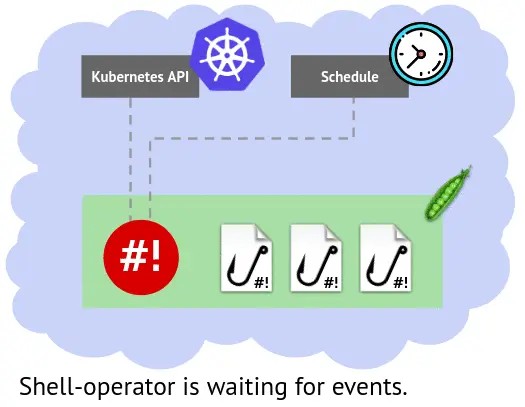
实现部骤
- 创建shell-operator项目
1
| $ oc new-project shell-operator
|
- 为该项目创建serviceAccount
monitor-namespaces-acc,将给它授予获取全局namespace的权限
1
2
3
4
5
6
7
8
9
10
11
12
13
14
15
16
17
18
19
| $ cat << EOF | oc create -f -
---
apiVersion: v1
kind: ServiceAccount
metadata:
name: monitor-namespaces-acc
---
apiVersion: rbac.authorization.k8s.io/v1beta1
kind: ClusterRole
metadata:
name: monitor-namespaces
rules:
- apiGroups: [""]
resources: ["namespaces"]
verbs: ["get", "watch", "list"]
EOF
$ oc adm policy add-cluster-role-to-user monitor-namespaces -z monitor-namespaces-acc
|
- 创建一个configmap,其中data中的内容为hook脚本
1
2
3
4
5
6
7
8
9
10
11
12
13
14
15
16
17
18
19
20
21
22
23
24
25
26
27
28
29
30
31
32
33
34
35
36
37
38
39
40
41
| $ cat << EOF | oc create -f -
apiVersion: v1
data:
shell-hook.sh: |-
#!/usr/bin/env bash
if [[ $1 == "--config" ]] ; then
cat <<EOF
{"onKubernetesEvent":[
{
"name":"OnCreateDeleteNamespace",
"kind": "namespace",
"event":["add", "delete"]
},
{
"name":"OnModifiedNamespace",
"kind": "namespace",
"event":["update"],
"jqFilter": ".metadata.labels"
}
]
}
EOF
else
bindingName=$(jq -r '.[0].binding' $BINDING_CONTEXT_PATH)
resourceEvent=$(jq -r '.[0].resourceEvent' $BINDING_CONTEXT_PATH)
resourceName=$(jq -r '.[0].resourceName' $BINDING_CONTEXT_PATH)
if [[ $bindingName == "OnModifiedNamespace" ]] ; then
echo "Namespace $resourceName labels were modified"
else
if [[ $resourceEvent == "add" ]] ; then
echo "Namespace $resourceName was created"
else
echo "Namespace $resourceName was deleted"
fi
fi
fi
kind: ConfigMap
metadata:
name: hooks
EOF
|
- 运行shell-operator应用
1
2
3
4
5
6
7
8
9
10
11
12
13
14
15
16
17
18
19
20
21
22
23
24
25
26
27
28
29
30
31
32
| $ cat << EOF | oc create -f -
apiVersion: apps.openshift.io/v1
kind: DeploymentConfig
metadata:
labels:
run: shell-operator
name: shell-operator
spec:
replicas: 1
selector:
run: shell-operator
template:
metadata:
labels:
run: shell-operator
spec:
serviceAccount: monitor-namespaces-acc
containers:
- image: 'flant/shell-operator:latest-alpine3.9'
imagePullPolicy: IfNotPresent
name: shell-operator
volumeMounts:
- mountPath: /hooks
name: hooks-no934
volumes:
- configMap:
defaultMode: 511
name: hooks
name: hooks-no934
triggers:
- type: ConfigChange
EOF
|
说明:
- 应用启动使用
monitor-namespaces-accserviceAccount
- 将configmap内容挂载到deployment应用的/hooks目录中
- 挂载文件需要给可执行权限
defaultMode: 511
验证
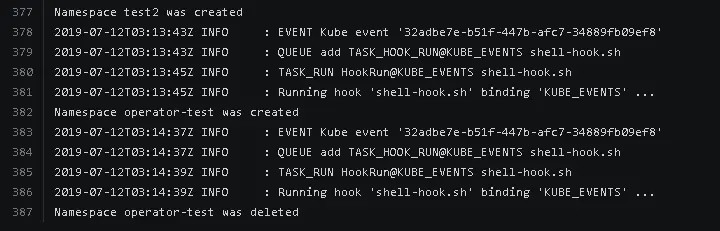
- 创建一个project/删除该project
1
2
| $ oc new-project operator-test
$ oc delete project operator-test
|
- 查看shell-operator的日志
额外补充
Shell Operator支持绑定三种hook触发类型
- onStartup
onStartup类型只有一个参数:”onStartup”设置绑定顺序
- schedule
schedule绑定用于周期性运行,支持秒级粒度定义计划
1
2
3
4
5
6
7
8
9
10
11
| {
"schedule": [
{"name":"every 10 min",
"crontab":"0 */10 * * * *",
"allowFailure":true
},
{"name":"Every Monday at 8:05",
"crontab":"0 5 8 * * 1"
}
]
}
|
- onKubernetesEvent
监听Kubernetes事件促发
1
2
3
4
5
6
7
8
| {
"onKubernetesEvent": [
{"name":"Execute on changes of namespace labels",
"kind": "namespace",
"event":["update"],
"jqFilter":".metadata.labels"
}]
}
|
将镜像带的kubectl命令行替换成oc命令行
1
2
3
4
5
6
7
8
9
10
11
12
13
14
| $ cat Dockerfile-oc
FROM ubuntu:18.04
ADD ./oc /bin/oc
ADD ./shell-operator /
RUN apt-get update && \
apt-get install -y ca-certificates wget jq && \
rm -rf /var/lib/apt/lists && \
chmod +x /bin/oc && \
mkdir /hooks
WORKDIR /
ENV SHELL_OPERATOR_WORKING_DIR /hooks
ENTRYPOINT ["/shell-operator"]
CMD ["start"]
$ docker build -f Dockerfile-oc -t docker.io/xhuaustc/shell-operator-oc:latest-3.11 .
|
其中oc从镜像openshift/origin-cli中导出,而shell-operator从镜像flant/shell-operator中导出
最终镜像保存在:docker.io/xhuaustc/shell-operator-oc:latest-3.11
总结
- 以上是使用configmap的方式向operator-shell注入自定义的钩子代码,非常灵活,最原始的operator-shell就能够满足各种不种的需求,十分方便。
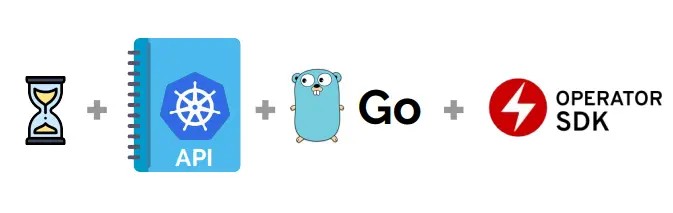
- shell-operator项目为我们自定义operator提供了一种非常便利的方式。同时它不仅仅支持bash,也可以支持python,需要在镜像中安装python包。
1
2
3
| $ cat Dockerfile
FROM flant/shell-operator:latest
RUN apk --no-cache add python
|
钩子代码的环境使用python
- 有了这个监控后,就可以非常方便地对Openshift/Kubernetes的资源进行控制,想像空间可以很大。
- 例子:有些项目的应用创建有先后关系,就可以方便地使用shell operator进行编排
- 例子:不同项目
dev/sit/uat 对不同的用户组 dev/test/ops 会有不同的权限 view/admin/image-puller ,就可以使用项目名格式给不同用户组授予不同的权限
- 与CRD结合,真正构建自己的operator,想像空间就变得更大了
- shell-operator项目地址:https://github.com/flant/shell-operator
参考文章
Shell-operator:用于简化Kubernetes operator的创建